Enterprise User Management: Active Directory Lab
Overview
To simulate a corporate IT environment, I built a virtualized Windows Server ecosystem. This lab focuses on centralized user management, security policies, and network resource administration—key components of modern enterprise IT support.
Architecture
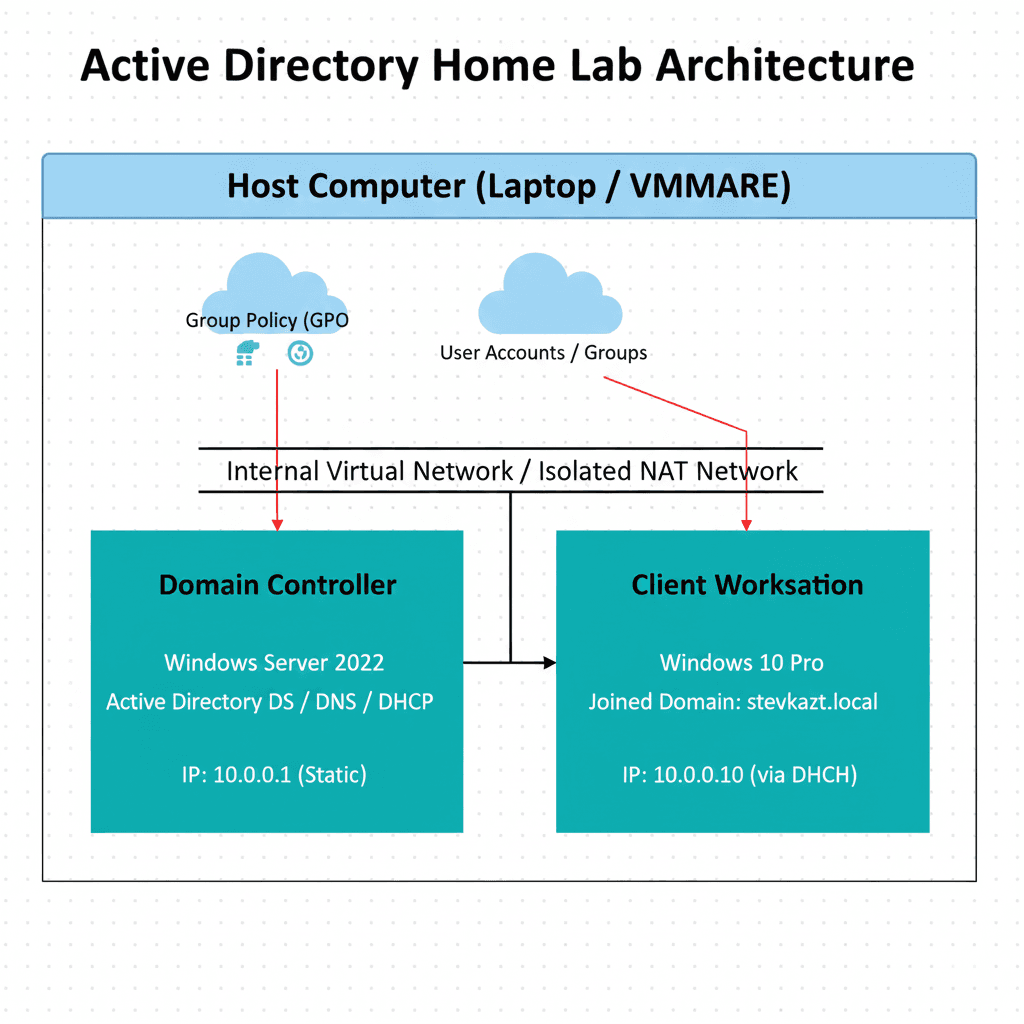
The lab environment is hosted on a hypervisor with the following configuration:
- Domain Controller (DC): Windows Server 2022 handling DNS, DHCP, and AD DS roles.
- Client Workstation: Windows 10 Pro joined to the stevkazt.local domain.
- Internal Network: Isolated NAT network to simulate a secure corporate LAN.
Implementation
I initialized the forest and domain using Server Manager. Once the DC was established, I focused on organizing the directory for scalability:
- Organizational Units (OUs): Created a logical structure for Departments (IT, Finance, Sales).
- User Administration: Developed a PowerShell script to bulk-import users with standardized naming conventions.
- Group Policy (GPOs): Configured security policies, including password complexity requirements and restricted Control Panel access for non-admin users.

Troubleshooting
During the setup, the Windows 10 client failed to join the domain despite being on the same subnet. I diagnosed this as a DNS resolution issue. The client was using the router's DNS instead of the Domain Controller's. After manually pointing the client's IPv4 DNS settings to the DC's static IP, the domain join was successful.
Results
- Successful deployment of a functional Windows Domain environment.
- Hands-on experience with the tools used by 90% of Fortune 500 companies.
- Deepened understanding of the relationship between DNS and Active Directory.
Technologies Used
- Windows Server 2022
- Active Directory Domain Services (AD DS)
- Group Policy Management (GPMC)
- VirtualBox / VMware
- PowerShell